

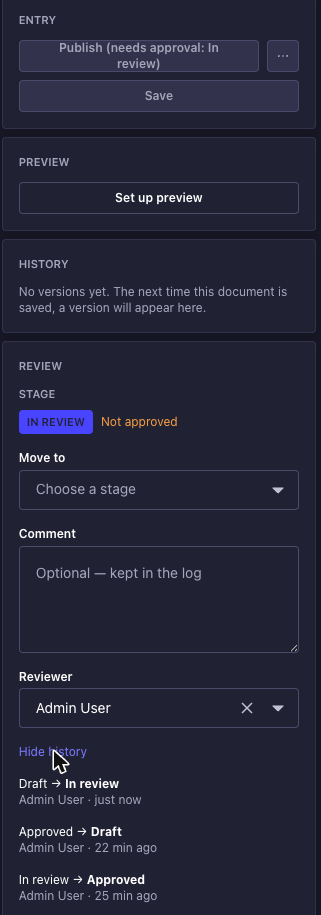
A document moves through stages - Draft, In review, Approved - each with a reviewer and its own rules about who may move it where. Until it reaches the approved stage, it cannot be published - note the greyed-out Publish button above, which names the stage that is holding it.
What this is, and what it is not
Strapi sells a feature called Review Workflows on its Enterprise plan. Greenlight is not that feature, is not a drop-in replacement for it, and does not share a line of code with it - it is written against the public documentation only.
The difference that matters is not the price. In Strapi’s implementation a stage is a label, not a gate: an editor can open a document sitting in “In progress” and hit Publish, and nothing stops them. The stage records an opinion about the document; it does not govern it.
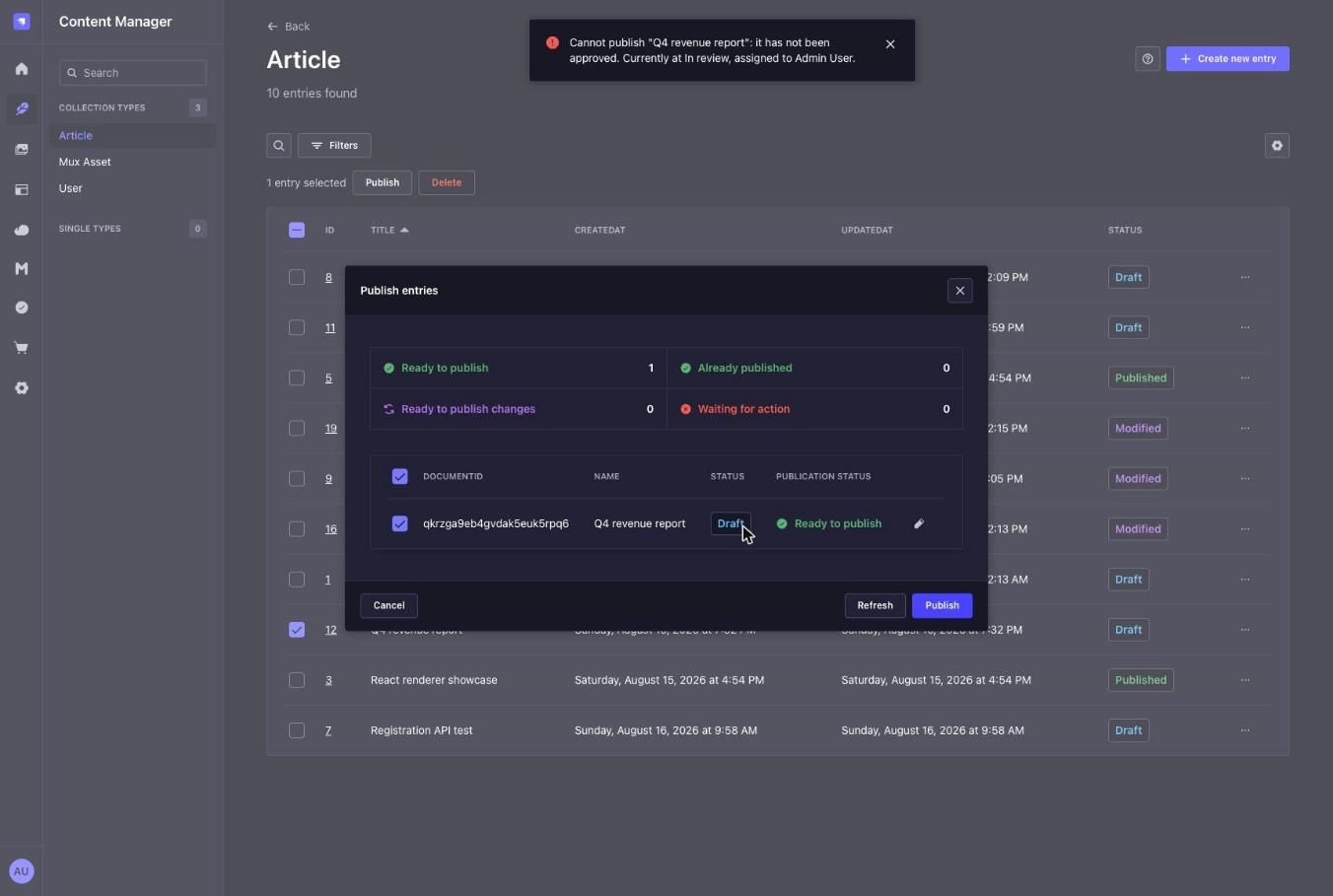
Greenlight’s stages govern it. A document outside its approved stage is refused at publish time by a check on the server, whichever route the publish came in by - the edit view, the list view’s bulk action, the REST admin API, or your own code calling the Document Service. That refusal is the product. Everything else here exists to make it usable.
It is also unmetered on purpose: Strapi’s plan limits how many workflows and stages you get. Greenlight limits neither.
Install
npm install @qkix/strapi-plugin-greenlight// config/plugins.ts
export default {
greenlight: {
enabled: true,
},
};
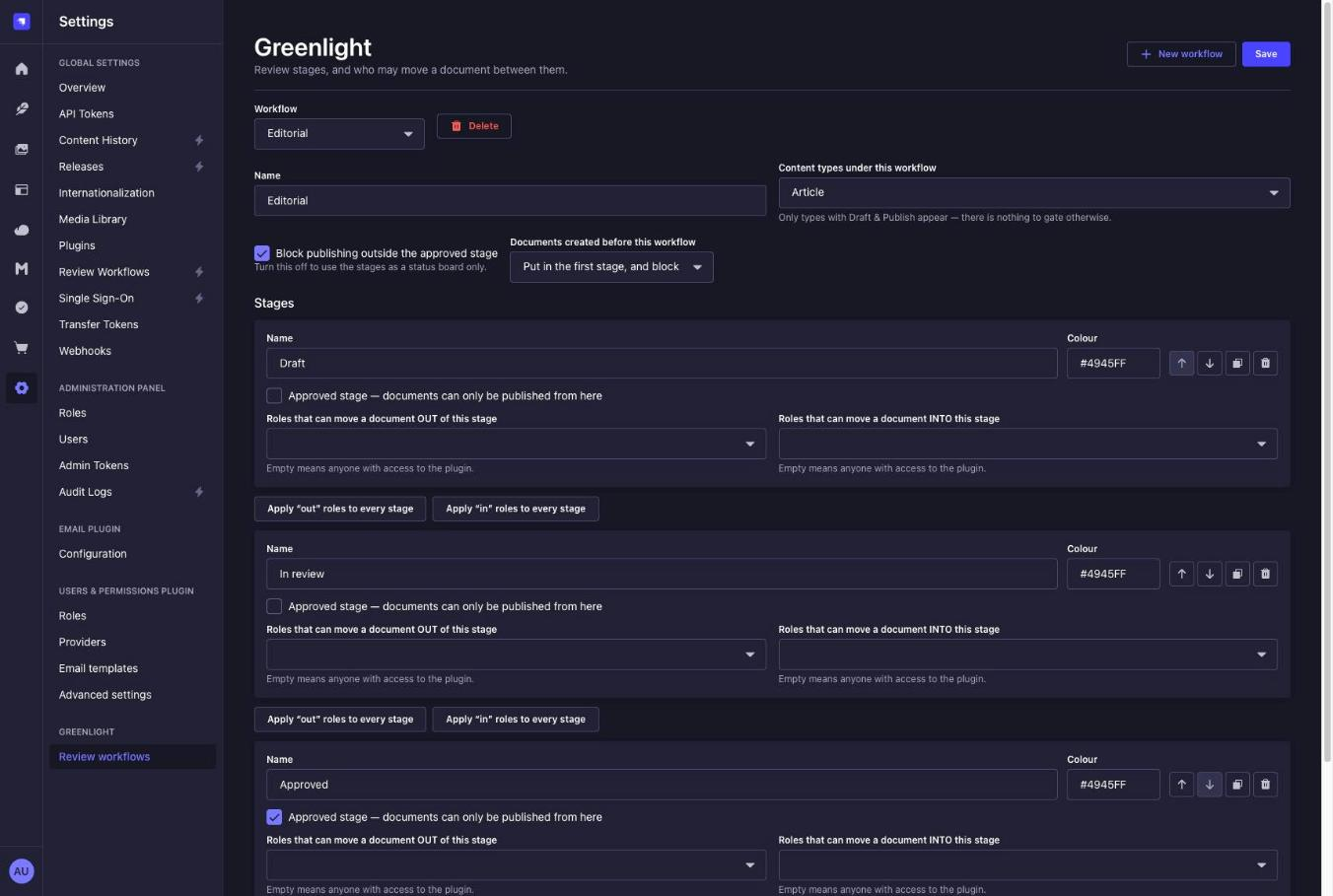
Then open Settings → Greenlight → Review workflows, create a workflow, and tick the content types it covers. Which content types are under review is not configured in code - it lives on the workflow, in the database, so a content type can be put under review without a deploy.
Only content types with Draft & Publish can be added. Without it there is no publish action to refuse, so a gate would be decorative; the settings page filters them out and the API rejects them with an explanation rather than failing later.
Collection types and single types are both supported, with the same panel, gate and queue.
How a document moves
Each stage carries two role lists: who may move a document out of it, and who may move a document in. The stages offered in the panel are the intersection of both.
Both lists matter. Without the “out” side there is no way to stop someone dragging a document back out of the approved stage, approving it again and publishing - and then the gate is theatre.
An empty role list means anyone with access to the plugin, not nobody. Intuition says the opposite. A stage configured with no roles is unrestricted, not a dead end.
A stage change saves immediately, with no separate Save button, matching the rest of that column in the edit view. Every change is written to an append-only log with the stage names and the user’s name copied in, so the history stays readable after a stage is renamed or an account is deleted.
Two reviewers with the same panel open cannot silently overwrite each other: each transition carries the version the panel was rendered with, and the second one gets a 409 telling it to refresh.
On the list view
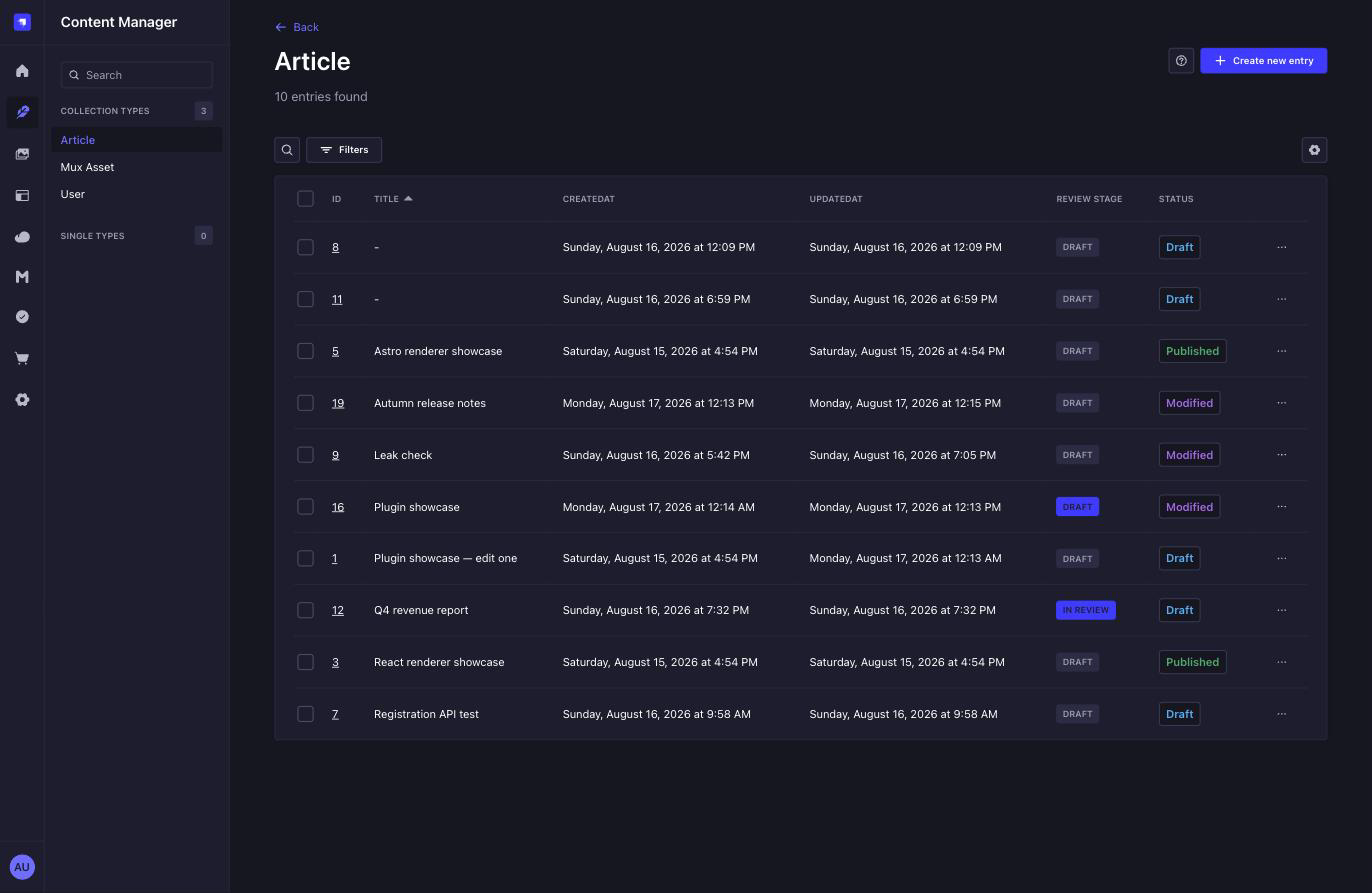
Every collection covered by a workflow gets a Review stage column and a filter to go with it, and no field is added to your content type to make either appear. A document that has never been through the workflow is shown greyed out, in the stage the gate would treat it as being in - so a collection that predates the plugin reads honestly rather than blank.
The whole page is answered in one request. The column and the greyed-out Publish buttons share it, so a page of rows asks once in total rather than once per row.
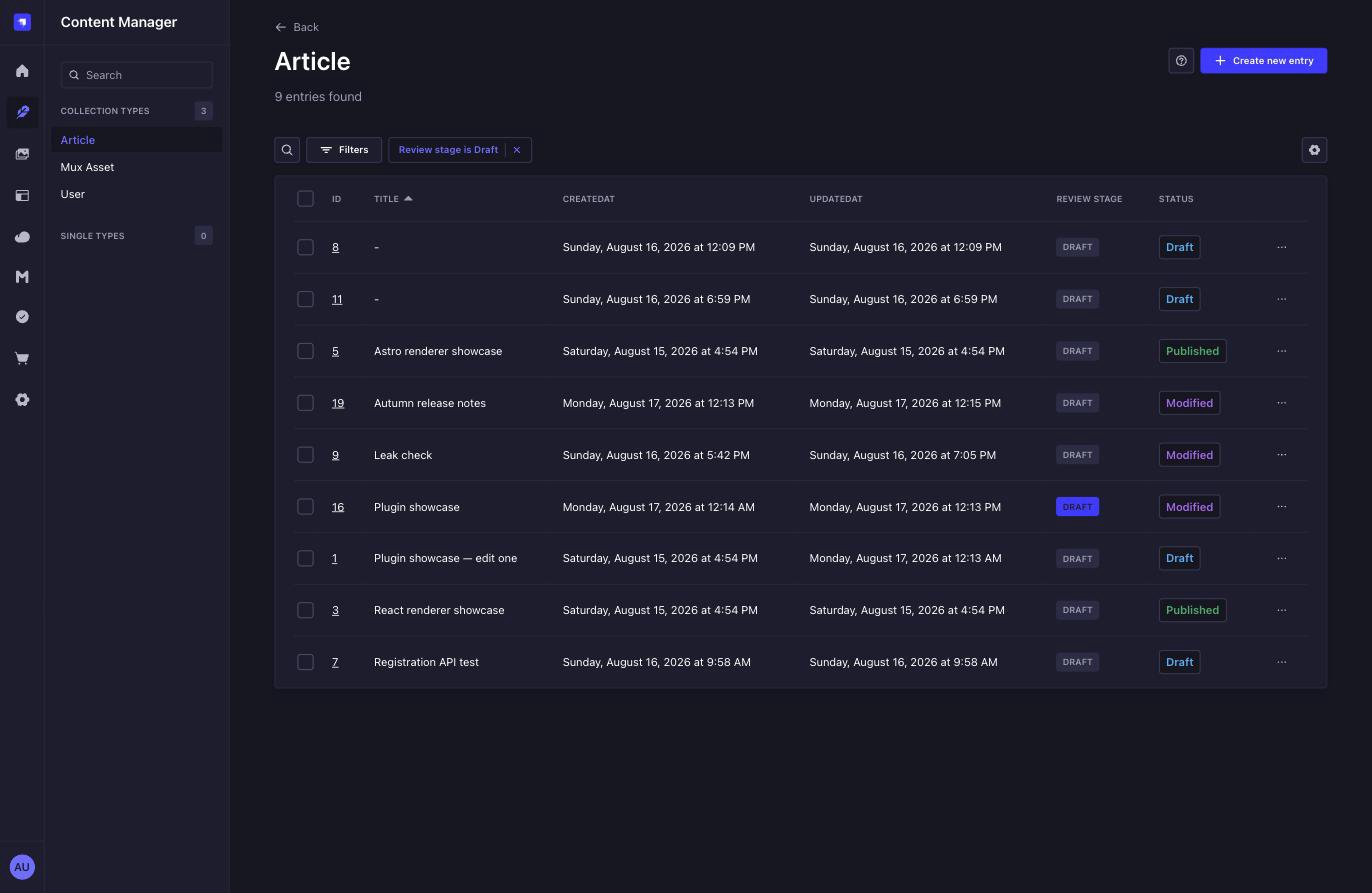
Filtering by a stage finds the documents implied to be in it too, not only the ones put there - which is why filtering by the first stage above returns nine of the ten, and not just the one that was actually moved into it.
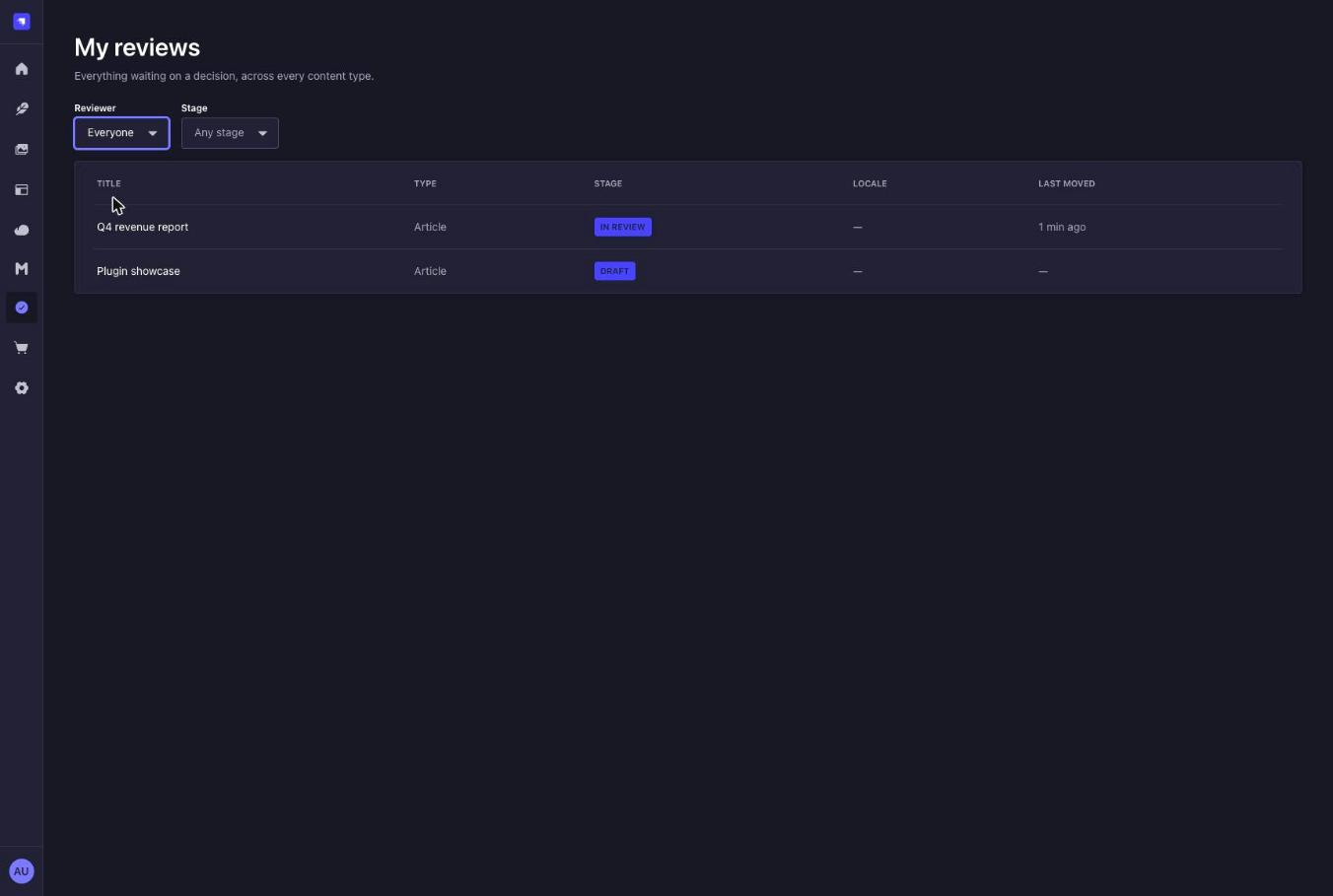
Three limits worth knowing. The column does not sort - sorting happens inside the Content Manager’s own query, which cannot see this plugin’s table. The filter offers only is and is not; every other operator would either mean nothing for a stage or have to be answered with a scan. And on the very first list view opened in a new browser session, the column and filter can be missing until you navigate once: the hooks that add them have to answer synchronously, and which content types are under review is a database answer, cached per session.
The filter is answered by resolving the stage to a set of documents before the query runs, which caps out: past 5,000 documents in one stage it returns an error naming the limit rather than a quietly incomplete list. Narrow the list with another filter first, or use My reviews.
Permissions
Three plugin permissions, set per role in Settings → Administration panel → Roles:
| Permission | What it allows |
|---|---|
read |
See the queue and move documents between stages |
settings.configure |
Create and edit workflows and stages |
assign |
Set the reviewer on a document |
These are the coarse switch. The rules about which stage a role may move a document into live on the stages themselves and are checked on the server, on the route - the panel hiding an option you cannot use is a convenience, not the enforcement.
superAdmin bypasses the per-stage role checks, and does not bypass the publish
gate. Deliberately: if it bypassed the gate the feature would be switched off for the
account most people develop and operate with.
System operations
Seeds, imports and migrations publish on purpose and have no reviewer to answer to. They pass a flag:
await strapi.documents('api::article.article').publish({
  documentId,
  locale: 'en',
  greenlight: { bypass: true },
});
The key is stripped before the call reaches Strapi’s own parameter handling. To be plain about what this is: anyone who can run server-side code can bypass the gate. Greenlight controls a process, it does not defend against your own developers.
Configuration
| Option | Default | What it does |
|---|---|---|
hooks.onTransition |
null |
Called after a stage change with the transition just recorded. The notification hook. |
transitionRetentionDays |
365 |
How long the transition log is kept. |
Greenlight does not send email. onTransition is where you do, and an error thrown inside
it is logged and swallowed - a notification outage must not be able to undo a review
decision that has already been written.
Known limitations
The stage filter is resolved before the query, not inside it. The Content Manager
validates every filter against your content type’s schema and rejects whatever is not an
attribute on it, so a stage - which lives in this plugin’s own table, not in your schema -
cannot be filtered directly. Greenlight answers the stage question first and hands the
Content Manager a documentId filter instead. That is why the 5,000-document limit above
exists, and why the filter cannot be combined with a sort on the stage.
Bulk publish fails as a batch, and the error names one document. If any selected entry
has not been approved, Strapi’s bulk publish rolls the whole batch back and reports the
first refusal. There is no warning beforehand: the Content Manager declares a
publishModalAdditionalInfos injection zone that would have been the right place for one,
but nothing renders it in Strapi 5.52, so the feature cannot be built today. The per-row
Publish action is disabled for unapproved entries, which is the closest available warning.
(Precisely how much of a batch survives a refusal is a race inside Strapi’s transaction bookkeeping, so Greenlight’s error message deliberately makes no claim about the other documents - no claim would be safe.)
Documents that predate the plugin have no stage. By default they are put in the first
stage and blocked, which is the honest behaviour: the alternative is that installing the
plugin changes nothing for existing content and somebody discovers that in production. Set
onMissingAssignment: 'allow' on the workflow to let them through instead.
Working alongside other plugins
Greenlight registers its publish gate in register() rather than bootstrap(), so it runs
outside plugins that snapshot documents - Rewind, for one. A
publish that is refused never reaches them, and no version is recorded for something that
did not happen.
If your licence has Strapi’s own Review Workflows enabled, Greenlight logs a warning at boot: both will show a panel in the edit view, and you probably want only one of them.
Roadmap
What is worth building next, what is deliberately not planned, and why: ROADMAP.md.
License
MIT © qkix